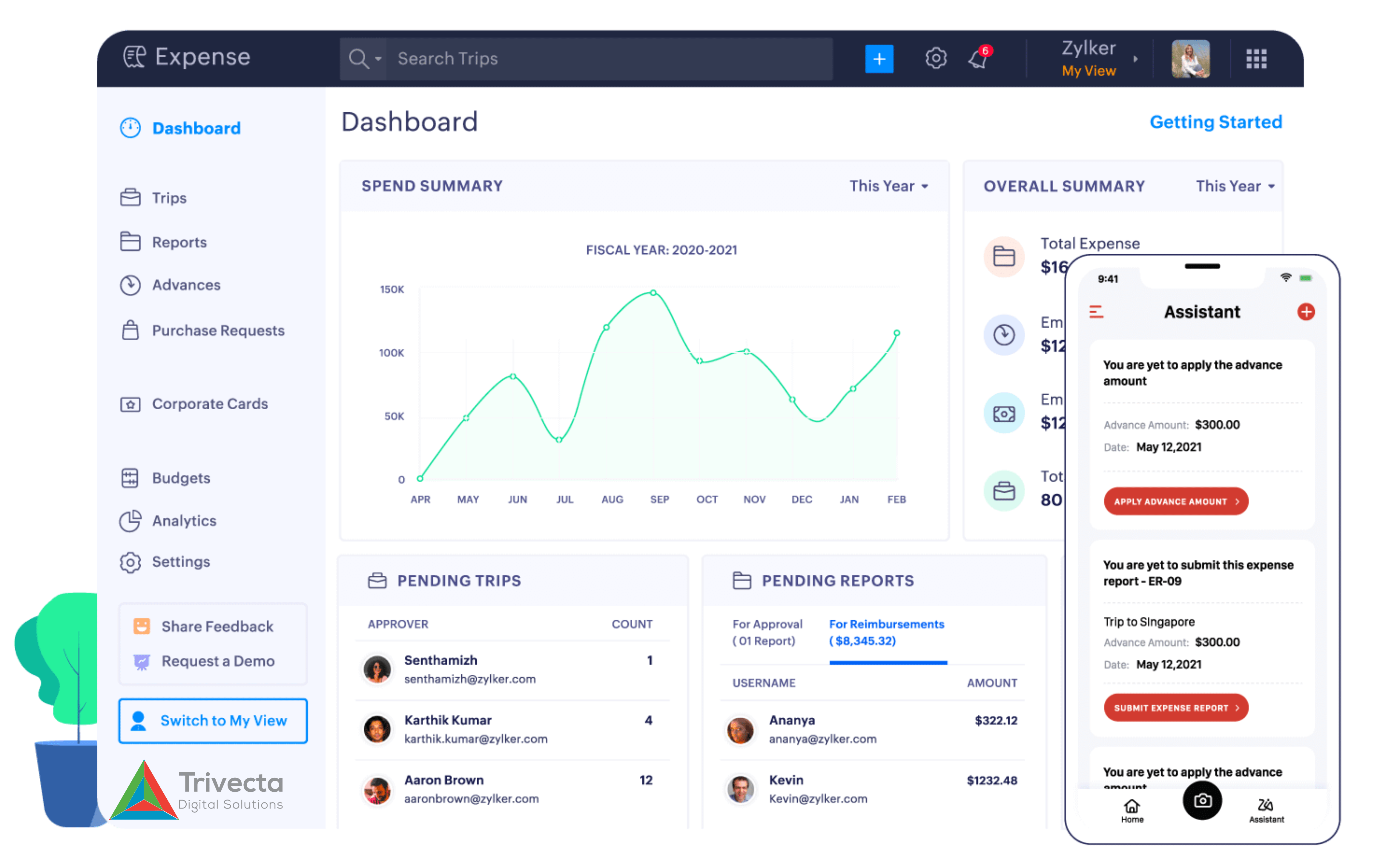
ZOho Inventory_Dash Board_Final

Beyond Basic: Trivecta Digital and Zoho Inventory Deliver Advanced Inventory Solutions

Beyond Basic: Trivecta Digital and Zoho Inventory Deliver Advanced Inventory Solutions

The thrill of growing sales — orders streaming in from Amazon, Shopify, your own website, and even WhatsApp — can quickly spiral into frustration. You think everything’s running smoothly until a customer orders a product that shows “in stock” online… but it’s missing from your warehouse shelf. Suddenly, your team is chasing down orders, buried in spreadsheets, managing late deliveries, and calming unhappy customers.


This is not just a busy day — it’s a sign your inventory system can’t keep up.


At Trivecta, we have seen this pattern across businesses of all sizes. That’s why we recommend Zoho Inventory — a solution that brings order, automation, and real-time visibility to everyday operations. Let’s explore the common challenges teams face, and how Zoho Inventory helps solve them — efficiently and at scale.


 1. You sold an Item that’s actually out of Stock 

The Challenge:

You receive an order from your online store, and your system indicates that the item is in stock. But when your warehouse team tries to ship it, they find it was already sold via Amazon. Now you’re facing a stock-out, a refund request, and a disappointed customer.


How Zoho Inventory Fixes It:

Zoho Inventory acts as your central nervous system, connecting all sales channels—Amazon, eBay, Shopify, and more—to provide real-time, synchronized stock levels. The instant a product sells on one platform, its availability updates everywhere else, virtually eliminating double-selling and safeguarding customer trust.


2. You are overloaded with Orders, and Packing Slips are a mess

The Challenge:

During a seasonal sale, orders spike. Your team is manually creating invoices and packing slips for each one. Mistakes creep in, some orders are delayed, and customers start asking for updates.


How Zoho Inventory Fixes It:

Zoho Inventory helps you automate the sales order workflow. The moment an order comes in, you can convert it into a packing slip, invoice, and shipping label in just a few clicks. It even supports batch picking, allowing your team to handle 50+ orders at once instead of processing them one by one.


3. You don’t know when or what to restock

The Challenge:

You either overstock and run into storage issues, or understock and lose sales. There is no middle ground because your team doesn’t have reliable data on sales trends or inventory movement.


How Zoho Inventory Fixes It:

With intelligent reorder points, Zoho Inventory alerts you when a product hits a minimum threshold. You get demand forecasts, low stock alerts, and purchase order suggestions based on real sales data. This way, you always know when and how much to restock — without guesswork.


4. Your team spends hours creating Purchase Orders

The Challenge:

Every time you need to reorder, you manually create a PO, email it to the vendor, track incoming stock, and reconcile it during delivery. It’s time-consuming and prone to errors.


How Zoho Inventory Fixes It:

Zoho Inventory lets you automate your purchase management. You can generate POs with pre-filled item and vendor details, track pending deliveries, and automatically update your stock when items arrive—all within a few clicks, saving your team valuable hours.


5. Returns are a Nightmare

The Challenge:

A customer returns part of their order. Your team isn’t sure how to manage the reverse entry, credit notes, or update the stock count. The result? Lost time, incorrect records, and sometimes, even refund delays.


How Zoho Inventory Fixes It:

With built-in returns and credit note management, Zoho Inventory simplifies the reverse flow. You can partially or fully accept returns, issue credit notes, and reflect the changes in your inventory instantly. No extra spreadsheet required.


6. You have no idea what is selling well — or what’s not

The Challenge:

Without clear reports, you can’t identify your best-selling products, slow movers, or high-performing sales channels. You are making purchase decisions blindly.


How Zoho Inventory Fixes It: 

Zoho Inventory comes with ready-made analytics and customizable reports. You can view sales by product, region, or channel. The system helps you answer key questions like:

  • Which item brings the most revenue?

  • Which vendor delivers the fastest?

  • Where are delays happening?

With these insights, you can plan smarter, reduce dead stock, and boost profitability.


7. Your business is growing — but your tools are not

The Challenge:

What started as a five-product business is now handling 200 SKUs across 3 warehouses. But your systems haven’t kept up. Operations are slowing down, and you are missing opportunities.


How Zoho Inventory Fixes It:

Zoho Inventory is built to scale with your business. Whether you are handling bulk shipments, multiple warehouses, barcode-based picking, or international orders with multi-currency, it can handle it. And the best part? It integrates with Zoho Books, Zoho CRM, and third-party logistics apps so everything stays in sync.


Real Problems Need Real Solutions

Inventory management is not just about knowing what is in your warehouse; it’s about enabling smooth operations, faster deliveries, better customer experiences, and confident business decisions.


Zoho Inventory brings structure to chaos, automation to manual tasks, and clarity to your data. It’s not just a tool—it’s a smarter way to grow.


If you are tired of putting out fires in your inventory workflow, maybe it’s time to put a system like Zoho Inventory to work for you with Trivecta Digital.


Success Stories

Explore how other businesses have optimized their operations with Zoho Solutions through Trivecta Digital.

Let’s talk about streamlining your inventory with Zoho Inventory.

Book a Demo to get started.

Visit our blog page.

blog 1

Trivecta Digital Helps You Simplify Accounting with Zoho Books

Trivecta Digital Helps You Simplify Accounting with Zoho Books

Tired of chasing payments, fixing tax errors, or wondering where your cash actually goes? Accounting problems rarely come from complexity — they usually come from disconnected processes and tools that don’t scale with your needs. At Trivecta, we work with growing businesses to streamline their accounting systems using Zoho Books — so you can focus less on fixing mistakes and more on moving forward.

Here’s how Zoho Books addresses real-world issues that many businesses deal with daily.

  1. Invoices go out, but payments come in late — or not at all.

What usually happens:

You send the invoice, then follow up a week later. Maybe again the week after. Some clients pay late, others forget. And meanwhile, you’re digging through emails to check who paid what.

What changes with (Zoho Books – Invoicing, Online Payments & QR Support):

Set up automatic reminders, track invoice views, and collect payments online via multiple gateways. You can even include QR codes right on the invoice — so customers can scan and pay instantly.

You always know who’s paid, what’s due, and where things stand — no manual follow-ups required.

  1. Bank balances and books are always out of sync.

What usually happens:

You’re manually updating bank statements, trying to match transactions line by line. Sometimes entries get missed, duplicated, or mismatched entirely.

What changes with (Zoho Books – Bank Feeds & Reconciliation):

Zoho Books connects directly with your bank to fetch statements automatically. It auto-matches transactions with your records, so reconciliation is faster and more accurate.

You can also see your actual bank balance alongside your accounting balance, helping you make informed decisions without switching between portals.

  1. You have to ask, “Can we afford this?” because there’s no clear cash flow view.

What usually happens:

You’re looking at your bank account, recent invoices, and upcoming bills — all in different places. It’s hard to get a real sense of where you stand.

What changes with (Zoho Books – Cash Flow Reports & Real-Time Dashboard):

You get a live view of cash in/cash out, receivables, and upcoming expenses in one place. It’s not just about what’s in the bank today — it’s about what’s coming.

  1. GST filing eats up time every month.

What usually happens:

Someone’s preparing sheets manually. You’re double-checking tax amounts. Uploading invoices to the GST portal. Fixing mismatches. It’s a tedious, error-prone process every return cycle.

What changes with (Zoho Books – GST Compliance, Return Filing & E-Invoicing):

Zoho Books auto-applies GST rates to every sales and purchase transaction, tracks GST treatment, and lets you generate e-invoices with IRNs and QR codes as per government norms. As a GST Suvidha Provider, it also lets you file returns directly from the app, reconcile transactions, and stay tax-ready with real-time summaries and validations.

  1. You don’t know where your money goes — especially the small stuff.

What usually happens:

Receipts go unrecorded, small expenses pile up unnoticed, and categories are inconsistent. You realize it only when margins seem off.

What changes with (Zoho Books – Expense Tracking & Receipt Scanning):

Auto-scan receipts, log recurring or one-time expenses, and categorize them instantly. Attach supporting documents directly to transactions, organize them in folders, and access them anytime. No more paper clutter or scattered files — just clean, connected expense records.             

  1. Approvals, quotes, and client communication are scattered.

What usually happens:

You send a quote over email. They approve it late. Then the invoice goes out. Then payment. It’s all over the place, and no one has a clear trail.

What changes with (Zoho Books – Quotes, Sales Orders & Client Portal):

Quotes, invoices, and approvals happen in one workflow. Clients can access a portal, view past documents, and pay directly — no digging through email threads.

  1. Your sales and purchase records don’t match the inventory.

What usually happens:

You have stockouts even though the books said there was enough. Or you overorder because no one had a clear count.

What changes with (Zoho Books – Inventory Management):

Inventory auto-updates when you buy or sell. You get alerts when stock is low, and purchase orders are tied to actual need — not guesswork.

Ready to Simplify Your Accounting?

You don’t need more tools. You need the right ones that talk to each other. Zoho Books brings invoicing, banking, compliance, expenses, and reporting into one connected system — built to save time, reduce errors, and give you visibility when you need it most.

At Trivecta, we help businesses implement and customize Zoho Books to fit their unique accounting workflows — from setup to ongoing support.

Let’s talk about streamlining your accounting with Zoho Books.

Book a Demo to get started.

Visit our blog page.

Measurematic-Post-Design-1096x626

123

Measurematic-Post-Design-1096x626

Measure Matic: Built for Apparel Brands That Value Accuracy and Efficiency

Measure Matic: Built for Apparel Brands That Value Accuracy and Efficiency

In the fast-paced world of apparel design and custom tailoring, accuracy and efficiency are key. Whether it’s a premium clothing brand or a growing chain of bespoke boutiques, businesses need a reliable way to manage customer measurements without the risk of manual errors.

Introducing Measure Matic—a smart, cloud-based application developed by Trivecta Digital and built on Zoho Creator, designed to simplify how apparel professionals handle measurements, appointments, and size charts—all in one place.

Why Measure Matic?

Through our experience working with fashion brands and garment businesses, we noticed a recurring challenge—measurement data was often handled manually, leading to inconsistencies, delays, and operational overhead.

Measure Matic was developed to solve this by giving apparel teams a seamless, digital way to manage measurement workflows—improving accuracy, reducing errors, and saving time.

Core Features That Matter

  1. Multi-Store Location Management: Easily manage multiple branches under a single platform. Each store location can have its own admin access and user permissions, ensuring better control and accountability. From onboarding a new store to tracking individual performance, this feature helps streamline operations across regions or franchise networks.
  2. Secure Customer Profiles & Measurement History: Create detailed customer profiles that store not just measurements, but also preferences, fit history, and appointment logs. All information is protected with end-to-end encryption and role-based access, ensuring that only authorized personnel can view or update sensitive data—keeping customer trust and compliance intact.
  3. Smart Size Charts with Visual Aids: Manage detailed, gender- and category-specific size charts with interactive visual references to eliminate confusion and improve accuracy. Whether you’re working with standard sizes or fully customized fits, visual guidance ensures consistency across your design and fitting teams.
  4. Precise Size Calculation:Leverage built-in logic to auto-calculate sizes based on inputs, helping eliminate common errors in manual interpretation. The system adjusts for measurement tolerances and special fitting conditions, providing precise outcomes that reduce remakes and customer dissatisfaction
  5. Appointment Tracking: Get full visibility into your staff’s availability and schedule appointments without back-and-forth calls. Automatically update delivery statuses and notify team members or customers in real time, improving turnaround and client satisfaction with timely service updates.
  6. Cloud-Based & Scalable: Enjoy anytime, anywhere access to your data with cloud-based infrastructure. Whether you’re scaling from a single boutique to a multi-city presence, Measure Matic adapts to your operational model—supporting easy customizations and integrations through Zoho Creator’s flexible low-code environment.
  7. Built with Zoho Creator: Enjoy the flexibility of Zoho’s low-code platform, allowing for future scalability and customization based on your needs.

Proven Impact

Apparel businesses using Measure Matic have seen real results—from faster onboarding of clients to more confident fittings. The platform minimizes human error and gives design teams the confidence that every measurement recorded is accurate and accessible when needed.

By replacing paper records and spreadsheets, Measure Matic helps teams operate smarter and focus on delivering exceptional customer experiences..

A Vision for the Future

At Trivecta Digital, our mission is simple—build solutions that solve everyday challenges for modern businesses. As an Advanced Partner of Zoho, we leverage the platform’s full potential to deliver scalable and impactful digital tools like Measure Matic.

This application reflects our commitment to transforming workflows and empowering apparel professionals with reliable technology.

Explore Measure Matic on the Zoho Marketplace and see how it can elevate your measurement process: 

Join the movement towards streamlined measurement management today.

automation-testing-blog-featured-new1-1096x617

What are the most challenging types of testing to automate?

What are the most challenging types of testing to automate?

Test Automation is an essential component of the Software Development Lifecycle (SDLC). However, not all types of testing are created equal when it comes to automation. Some testing types pose unique challenges that can make automation particularly difficult.

1,157 QA Engineers, Managers and Leaders were asked this question:

“What type of testing do you find most challenging to automate?”

  • UI/UX testing
  • Performance testing
  • Security testing
  • API testing

1. Security Testing (47% of respondents chose this)

Challenges: Security testing helps identify vulnerabilities that could be exploited by malicious actors. Automating this testing is complex due to the constantly evolving nature of threats and the need for deep analysis of code and configurations.

  • Dynamic Threat Landscape: Security threats are constantly evolving. Hackers find new vulnerabilities and develop new attack methods, making it challenging for automated tools to stay updated and effective. For example, a vulnerability that wasn’t known yesterday might be exploited today.
  • Contextual Awareness: Automated security tests often lack the contextual understanding necessary to identify nuanced vulnerabilities. For example, a security flaw might depend on how a user interacts with an application, which automation tools might not fully capture.
  • False Positives/Negatives: Automated security testing tools often struggle with accuracy. They might flag harmless activities as threats (false positives) or miss actual threats (false negatives). This can lead to either unnecessary alarm and wasted resources or, worse, undetected breaches that compromise data security.

Solutions:

  • Use a Combination of Tools: Leverage multiple automated security testing tools to cover a broader range of vulnerabilities.
  • Regular Updates and Custom Scripts: Regularly update your security tools to recognize the latest threats, and develop custom scripts to address specific vulnerabilities unique to your application.
  • Manual Review: Complement automated tests with periodic manual security assessments to catch complex issues that automation might miss.

2. UI/UX Testing (28% of respondents chose this)

Challenges: UI/UX testing focuses on the overall user experience, ensuring that the application is intuitive and user-friendly. UI/UX testing is challenging to automate due to the following challenges:

  • Subjectivity: User experience is inherently subjective. What works well for one user might not be favorable for another, making it difficult to create universally applicable automated tests.
  • Frequent UI Changes: Modern web applications often undergo rapid design changes, leading to frequent updates in the UI that require constant maintenance of automated tests.
  • Complex Interactions: Many UI elements involve intricate interactions, such as hover effects, animations, and dynamic content loading, which are hard to automate reliably.

Solutions:

  • Leverage Visual Regression Testing: Use visual regression testing tools to detect UI changes and ensure that the look and feel of the application remain consistent after updates.
  • Incorporate User Feedback: Utilize user testing sessions to gather qualitative data on user experience and integrate this feedback into the automated testing process.
  • Regular Maintenance of Test Scripts: Schedule regular reviews and updates of automated test scripts to adapt to changes in the application’s UI.

3. Performance Testing (15% of respondents chose this)

Challenges: Performance testing evaluates how an application performs under various conditions, such as high user load. Automating performance testing can be complex due to the need to replicate different performance scenarios accurately.

  • Realistic User Simulation: Creating accurate simulations of user behavior under varying loads is difficult. Automated tests need to mimic real-world scenarios, including different user paths and transaction types.
  • Environmental Factors: Performance tests can be affected by external factors such as network latency, server performance, and concurrent user access, making it hard to obtain consistent results.
  • Infrastructure Dependencies: Performance tests often rely on the underlying infrastructure (like databases and servers), which can introduce variability in test results based on system performance at the time of testing.

Solutions:

  • Use Load Generators: Implement load generators that can simulate real user behavior under various scenarios to accurately assess performance.
  • Analyze Metrics Continuously: Continuously monitor performance metrics and logs to understand how the application behaves in real-world scenarios.
  • Scale Testing Environments: Set up testing environments that closely mimic production to ensure that performance tests yield accurate results.

4. API Testing (10% of respondents chose this)

Challenges: API testing focuses on validating the communication between different software systems. While automation of API tests is generally easier than UI testing, it can still pose challenges, especially when it comes to handling complex data inputs, authentication mechanisms, and integrations across multiple APIs. Difficulties often arise in maintaining stable API environments and simulating various API conditions such as rate limits or server downtime.

  • Complex Response Structures: APIs often return complex, nested data structures. Ensuring that automated tests can accurately validate the correctness of these structures can be challenging.
  • Dependency on External Services: APIs frequently interact with external services, making them vulnerable to outages and performance issues beyond the control of the development team, which can result in inconsistent test results.
  • Versioning and Backward Compatibility: Managing API versioning and ensuring backward compatibility can complicate testing, as older versions may still be in use by clients.

Solutions:

  • Mock External Services: Use mock frameworks to simulate external services and their responses, allowing for more controlled testing environments.
  • Comprehensive Error Handling Tests: Design tests that validate not only successful responses but also various error scenarios to ensure robustness.
  • Automate Continuous Testing: Integrate API testing into a continuous integration/continuous deployment (CI/CD) pipeline to ensure ongoing validation as changes are made.

Conclusion

By recognizing these challenges and applying effective troubleshooting strategies, organizations can enhance software quality, meet user expectations, and address security threats. A blend of automated and manual testing, combined with continuous evaluation, will ensure a successful automation journey.

Trivecta Digital expands offerings for the Manufacturing vertical through Odoo partnership

Trivecta Digital expands offerings for the Manufacturing vertical through Odoo partnership

Chennai, India, 17 September 2024 – Trivecta, a leading Information Technology solutions provider, is proud to announce that it has partnered with Odoo, a renowned open-source Enterprise Resource Planning (ERP) platform. This collaboration will strengthen Trivecta’s ability to deliver customized solutions to the manufacturing industry, helping them overcome key challenges such as production planning and scheduling, limited supply chain visibility, rising production costs, and difficulty in expense tracking.

Sumit Yadav, Channel Account Manager at Odoo, expressed enthusiasm about the partnership, saying, “Partnering with Trivecta Digital marks a pivotal step in expanding Odoo’s footprint within the manufacturing sector. This strategic alliance is set to unlock unprecedented opportunities for SMEs across India, offering them access to Odoo’s comprehensive suite of applications along with Trivecta’s expertise in delivering custom solutions. Our platform is designed to streamline operations, enhance efficiency, and drive significant cost reductions, ultimately boosting overall productivity. Trivecta’s tailored approach to addressing specific manufacturing challenges aligns perfectly with Odoo’s mission to equip businesses with cutting-edge tools. Together, we are committed to accelerating the adoption of Odoo’s transformative solutions, reaching a broader audience of manufacturers and empowering them to achieve new levels of success.”

Ramanan R V, CEO, Trivecta Digital, said, “Our partnership with Odoo allows us to offer an adaptable and cost-effective ERP solution to manufacturing companies, helping them manage their growing needs. At Trivecta Digital, we understand the strategic priorities of our manufacturing customers, and this collaboration enables us to offer solutions that are aligned with their goals of increasing productivity, reducing costs, and driving sustainable growth.”

Paramasivam Venkataramasamy, Co-founder and CTO, Trivecta Digital, added, “From a technical standpoint, Odoo’s modular architecture aligns perfectly with the complex workflows in manufacturing. By integrating Odoo’s capabilities with our expertise,By integrating Odoo’s capabilities with our expertise, we can deliver more robust production planning and scheduling tools, enhance supply chain visibility, and streamline Product Lifecycle Management (PLM), while also improving supply chain visibility. By incorporating maintenance and quality control features, we provide real-time data that drives informed decision-making, optimizes costs, and ensures scalability across all operations.”

About Odoo

Odoo is a suite of open source business apps designed to meet the various needs of organizations: CRM, eCommerce, accounting, inventory, point of sale, project management, etc. 

About Trivecta Digital

Trivecta Digital is an information technology solutions and services provider specializing in Odoo consulting and implementation services. With a dedicated team of experts, Trivecta Digital leverages its extensive knowledge and experience to implement and customize Odoo’s suite of applications, enabling organizations to streamline operations and increase efficiency.

ColourLand chooses Trivecta as its Zoho Books and Zoho Inventory Implementation partner

ColourLand chooses Trivecta as its Zoho Books and Zoho Inventory Implementation partner

  • Chennai, Tamil Nadu – September 13, 2024: Trivecta Digital, a leading Information Technology solutions provider and Zoho Partner announced that Colourland Clothing, a leading Manufacturer of Uniforms, has chosen Trivecta as its Zoho Solutions (Zoho Books and Zoho Inventory) Implementation partner.

Colourland Clothing manufactures uniforms in large volumes for some of the largest national brands such as Ashok Leyland, Hero Motocorp, Honda, Hyundai, Tata Motors and TVS. Due to the large number of SKUs (finished products and raw material) the organization  faced operational challenges related to:

          ●  Inventory management

    • ●  Real-time visibility into stock

    • ●  Monitoring of consumption / wastage, and 

    • ●  On demand access to actionable data and insights

Paramasivam Venkataramasamy, Co-founder and CTO, Trivecta Digital, said, “Our mission is to identify, understand and address the unique challenges faced by our customers through Digital Transformation initiatives that are tailored to their specific needs. For Colourland, their challenges and gaps were mapped to the solutions and benefits delivered by Zoho Solutions. By implementing Zoho Books and Zoho Inventory, Colourland will gain  the real-time visibility and control they need over their inventory and accounting processes, ensuring they are well-equipped to handle their operations efficiently.”

“We are excited to partner with Trivecta Digital to enhance our operations by implementing Zoho Books and Zoho Inventory. Colourland has always been committed to quality and innovation, and this collaboration will allow us to continue delivering excellence while optimizing processes and improving efficiency,” said V. Balamurugan,  Founder & CEO, Colourland Clothing.

About Trivecta Digital

Trivecta Digital is an information technology solutions and services provider specializing in Zoho consulting services. With a dedicated team of experts, Trivecta Digital leverages its extensive knowledge and experience to implement and customize Zoho’s suite of applications, enabling organizations to streamline operations and increase efficiency.

About Colourland Clothing LLP

Colourland Clothing is a leading uniform manufacturer for the automotive industry, known for its state-of-the-art infrastructure and commitment to quality. Founded in 2005 in Coimbatore, Tamil Nadu, Colourland has become a trusted partner for major automotive brands and corporate customers across India.

About Zoho

Zoho Solutions are designed to streamline the financial and inventory management processes for small and medium-sized businesses. Zoho Books offers comprehensive accounting features such as invoicing, expense tracking, bank reconciliation, and financial reporting. Zoho Inventory provides real-time visibility into stock levels, streamlines order processing, and ensures efficient inventory control.

For more information, contact customer.success@trivectadigital.com

AI-Driven-Software-Testing-Minimizing-False-Positives-Negatives-2-1096x617

AI-Driven Software Testing – Minimizing False Positives and False Negatives

AI-Driven Software Testing – Minimizing False Positives and False Negatives

The major challenge in AI-driven software testing is achieving high accuracy. Despite advanced algorithms, QA teams typically achieve on an average 90% accuracy in identifying true positives.

Here are three solutions to minimize false positives and false negatives when utilizing AI in software testing:

1. Training Data Quality and Diversity

The quality and diversity of training data play a critical role in the performance of AI models. To reduce both false positives and false negatives, it is essential to provide a large volume of data that accurately represents the application’s functionality and potential issues.

  • Data Augmentation: This technique involves generating new data points by augmenting existing data. For instance, if the system is tested for UI responsiveness, different screen resolutions, orientations, and device types should be included in the training data. In the context of testing a chatbot, data augmentation could involve rephrasing questions in different ways, ensuring the model can understand and respond accurately to varied user inputs.
  • Comprehensive Test Cases: A well-rounded dataset must cover all functional and non-functional aspects of the software. This includes common scenarios, edge cases, and negative testing scenarios where the system should fail gracefully. For example, in testing a payment gateway, the training data should include valid transactions, declined transactions, and edge cases like unusual currencies or payment methods.
  • Data Sourcing and Labeling: Obtaining a representative dataset may require sourcing data from multiple environments, including production-like environments, staging, and even real user data (anonymized and compliant with privacy regulations). Accurate labeling of this data is crucial to train the model to differentiate between normal and anomalous behavior correctly.

2. Active Learning and Continuous Feedback Loops

Active learning and continuous feedback loops help refine AI models by incorporating real-world test results and user feedback. This approach ensures that the model adapts to new patterns and reduces the likelihood of false positives and false negatives.

  • Feedback Integration: Establish a system where the AI’s predictions and outputs are regularly reviewed by QA engineers and, where applicable, by users. This feedback should be structured to capture detailed insights into why certain predictions were incorrect. For example, if a bug is falsely identified, the feedback should explain why it was not a bug.
  • Iterative Training: Schedule regular updates to the AI model with new data and feedback. This could be on a weekly or monthly basis, depending on the volume of new data and the pace of software updates. The model should also be tested on a validation set to ensure that updates do not degrade performance.
  • Human-in-the-Loop (HITL) Systems: Implement HITL systems where AI suggestions are verified by human testers before being accepted as final. This hybrid approach allows the AI to handle the bulk of repetitive tasks while leveraging human judgment for complex or ambiguous cases.

3. Hybrid Testing Approaches

Combining AI-driven testing with traditional testing methods can effectively reduce false positives and false negatives. Hybrid approaches leverage the strengths of both AI and manual testing to create a more robust testing framework.

  • AI-Enhanced Test Case Generation: Use AI to analyze historical data, user feedback, and application logs to generate prioritized test cases. For example, if historical data shows that a certain feature frequently causes issues, AI can prioritize test cases related to that feature.
  • Manual Verification and Validation: Even with advanced AI, human testers play a crucial role in verifying and validating AI-generated results. For instance, in exploratory testing, human testers can identify issues related to user experience, aesthetics, and usability that AI might miss.
  • Risk-Based Testing: Combine AI and manual testing efforts to focus on high-risk areas of the application. AI can handle routine, repetitive tests, freeing human testers to concentrate on complex scenarios and critical functionalities that require in-depth analysis.
Essential-AI-Tools-to-Overcome-Data-Challenges-in-Software-Testing-3-1096x617

Essential AI Tools to Overcome Data Challenges in Software Testing

Essential AI Tools to Overcome Data Challenges in Software Testing

In the previous article, we discussed the critical role of data in AI-driven software testing and highlighted the top 3 challenges:

  • Data Availability
  • Data Privacy and Security
  • Lack of Data Labeling and Annotation

Addressing these challenges is essential for maximizing the effectiveness of AI in identifying defects and optimizing test strategies. In this article, we will explore tools that can help overcome these data challenges.

Addressing Challenge #1 – Data Availability

Tool – Jira

What is the Data Availability challenge?

Data Availability issues include discrepancies in data format, structure, or content, as well as missing essential information like test execution records, defect logs, or historical data gaps.

How Jira addresses Data Availability challenges:

  • Standardization of Data Capture: Jira allows teams to create custom fields and standardized templates for logging test results and defects, ensuring consistent data recording. It also enforces validation rules on fields, ensuring necessary information is captured and correctly formatted before saving records.
  • Single Source of Truth: Jira acts as a centralized hub for all test data, including test execution records, defects, and historical logs. This centralization helps prevent data gaps, as all test data is stored in one location.
  • Comprehensive Tracking: Teams can track the life cycle of test cases and defects within Jira, providing a complete view that helps identify any missing data or historical records.
  • Reporting and Analytics: Jira’s reporting features allow teams to create dashboards that highlight discrepancies, such as variations in test result formats or missing records. This visibility helps teams quickly identify and address data inconsistencies.

Pricing

Jira offers offers flexible pricing plans ranging from a free tier for small teams to premium and enterprise levels.

Addressing Challenge #2 – Data Privacy and Security

Tool – Informatica

What is the Data Privacy and Security challenge?

Verticals like healthcare and financial services must adhere to strict data privacy regulations. These regulations restrict how data can be collected, stored, and shared, limiting the availability of data for AI training purposes.

How Informatica addresses Data Privacy and Security challenges:

  • Dynamic and Static Data Masking: Dynamic Data Masking protects sensitive data in real-time during access. Whereas, Static Data Masking permanently masks data in non-production environments for safe AI training. Together, they safeguard sensitive information across different use cases and environments.
  • Tokenization: Replaces sensitive data elements with non-sensitive equivalents, ensuring data privacy while maintaining the usability of data for analytics and AI.
  • Comprehensive Data Governance: Implements policies and procedures to manage data privacy and security across the organization. This ensures compliance with regulations and maintains the integrity and security of data.
  • Data Lineage: Tracks the flow of data from its origin to its final destination. This transparency helps in auditing and ensures that data handling complies with regulatory requirements.

Pricing

Informatica’s pricing for data masking solutions is typically customized based on the specific needs and scale of the organization.

Addressing Challenge #3 – Lack of Data Labeling and Annotation

Tool – Labelbox

What is the Data Labeling and Annotation challenge?

Data labeling in software testing involves marking test cases with outcomes, tagging code with potential issues, and categorizing user interactions, much like adding sticky notes to a book. Without clear labels, distinguishing between normal user interactions and genuine bugs can be daunting.

How Labelbox addresses Data Labeling and Annotation challenges:

  • Collaborative Annotation: Labelbox allows teams to collaboratively annotate data in real time, ensuring that multiple stakeholders can contribute insights and highlight important information, much like adding sticky notes together.
  • Customizable Workflows: Teams can create tailored workflows for labeling, ensuring that the specific needs of software testing—such as tagging outcomes of test cases or identifying areas in code that need attention are met efficiently.
  • Quality Assurance: Labelbox includes built-in quality assurance tools that help review and verify annotations, ensuring that marked test cases and tagged code sections are accurate and consistent, much like double-checking sticky notes for clarity.
  • Machine Learning Assistance: The platform leverages machine learning to assist with labeling tasks, reducing manual effort and speeding up the annotation process. This helps in quickly marking interactions and potential issues, similar to having a smart assistant that suggests where to place sticky notes.

Pricing

Labelbox offers flexible pricing plans tailored to meet the diverse needs of businesses seeking efficient and scalable data labeling solutions.

If you have any other queries, please contact us.

AI-in-Software-Testing-Top-3-Data-Challenges-1096x617

AI in Software Testing: Top 3 Data Challenges

AI in Software Testing: Top 3 Data Challenges

The Role of Data in AI-Driven Testing

Imagine you are trying to teach a new team member how to identify and fix software bugs. You would probably show them previous test data, test cases, bug reports and guide them through various test scenarios. Software testing AI tools, like this team member, needs extensive data sources to learn effectively. The more relevant, accurate and comprehensive the data, the more capable the AI tool becomes at identifying defects and optimizing test strategies.

Challenge #1 – Data Availability

Data Availability refers to discrepancies or variations in the format, structure, or content of the available data. For instance, if different teams record test results in various formats or use different terminologies, the dataset becomes inconsistent. Additionally, data gaps can occur when essential information is missing, such as missing test execution records, incomplete defect logs, or gaps in historical data.

Use Case – Sporadic Historical Test Records

Consider a scenario where historical test results are sporadically recorded. Some tests have detailed logs of steps taken, issues found, and resolutions, while others are missing this information. Such gaps and inconsistencies in AI training daa hinder pattern recognition and predictive accuracy.

Impact 

  • Reduced Accuracy: AI models depend on large volumes of accurate and representative data for accurate predictions.
  • Delays and Costs: Addressing data gaps can delay projects and increase testing and debugging costs.

Solution – Implementing Robust Data Management Practices

Just as a chef needs a well-organized kitchen, AI in software testing needs well-organized data.

  • Standardizing Data Collection: Implementing standardized processes for recording test results, defect logs, and user interactions can reduce inconsistencies. Automated data management tools can help enforce these standards, ensuring uniform data collection.
  • Enhancing Data Completeness : Ensuring that all relevant information is recorded can address the issue of incomplete data. Regular audits and reviews of data collection processes can help identify and fill gaps.

Challenge #2 – Data Privacy and Security

Data privacy and security are constraints to data availability, especially in verticals such as healthcare, financial services, and e-commerce.

Use Case – Healthcare App with Confidential Patient Data

A healthcare app company wants to use AI to predict critical bugs. The confidentiality requirements of patient data limits the amount and type of data AI tools can access, making it harder to develop accurate models. 

Impact 

  • Limited Data Access: Limited data access reduces the availability of training data, which in turn hinders the model’s capacity to make accurate predictions.
  • Extended testing time: With limited data, AI models need more iterations to achieve reliable results. Each iteration involves collecting feedback, refining the model, and retraining, which can prolong the testing timeline.

Solution – Anonymization and Data Masking

To comply with regulations, sensitive data used in testing can be anonymized or masked. While this protects privacy, it can maintain the realism and effectiveness of tests. Anonymization alters the data in a way that it cannot be linked back to an individual, even if combined with other data sources. For example, replacing specific ages with age ranges (example, 30-40 years instead of 36 years) or adding random noise or slight alterations to data values to prevent identification while still maintaining data integrity. On the other hand, data masking involves replacing sensitive data with fictional but realistic data that preserves the data format and integrity. 

Challenge #3 – Lack of Data Labeling and Annotation

Think of data labeling as adding sticky notes to a book to highlight important sections. In software testing, this means marking test cases with outcomes, tagging code with potential issues, and categorizing user interactions.

Use Case – Labeling User Interactions in an E-Commerce Platform

Imagine a large e-commerce platform that wants to improve its bug detection capabilities using AI. The platform processes millions of user interactions daily, from browsing products to completing purchases. The platform’s testing team faces the daunting task of manually reviewing and categorizing these interactions to identify potential issues. Without clear labels indicating which interactions lead to successful transactions and which encounter errors or glitches, identifying critical bugs becomes time-consuming and prone to errors.

Impact 

  • AI models struggle to learn what constitutes a bug: The AI model, trained on historical data, faces challenges in accurately distinguishing between normal user interactions and genuine bugs.
  • High false positives and negatives: Due to ambiguous or incomplete data labeling, the AI system generates a high number of false positives (incorrectly identifying non-issues as bugs) and false negatives (failing to detect actual bugs).

Solution – Automating Data Labeling

Imagine using a highlighter that automatically marks important sections in a textbook. Automating data labeling involves deploying machine learning (ML) algorithms and techniques to categorize and tag data automatically. Automating Data Labeling helps you analyze large volumes of historical data and identify patterns and anomalies that human annotators might miss or misinterpret. This capability enables precise identification of genuine bugs and can continuously learn from new data inputs and feedback, refining their labeling capabilities over time.

Conclusion

Addressing data challenges in AI-driven software testing is crucial for enhancing the accuracy, efficiency, and security of the testing process. High-quality and comprehensive data enables AI models to make accurate predictions, improving defect identification and test optimization. 

If you are interested in exploring specific tools to tackle these challenges, drop a comment below. In the next article, we will review tools available to address these challenges, exploring how they can be effectively implemented to optimize AI in software testing.

If you have any other queries, please contact us.